
A Cornell Notes Word Template is a practical solution for students, professionals, and educators who want to organize information in a clear and structured way. The Cornell note-taking system has been used for decades because it helps users separate important concepts, supporting details, and summaries into an easy-to-review format. With Microsoft Word, users can create flexible digital notes that are simple to edit, save, print, and share.
The popularity of the Cornell Notes Word Template continues to grow because digital learning and remote work have increased the need for organized documentation. Instead of writing notes randomly across a page, this template provides a professional layout that improves focus and helps users identify important information quickly. It is useful for lectures, study sessions, business meetings, research projects, and personal learning goals.
Understanding the Cornell Note-Taking Method
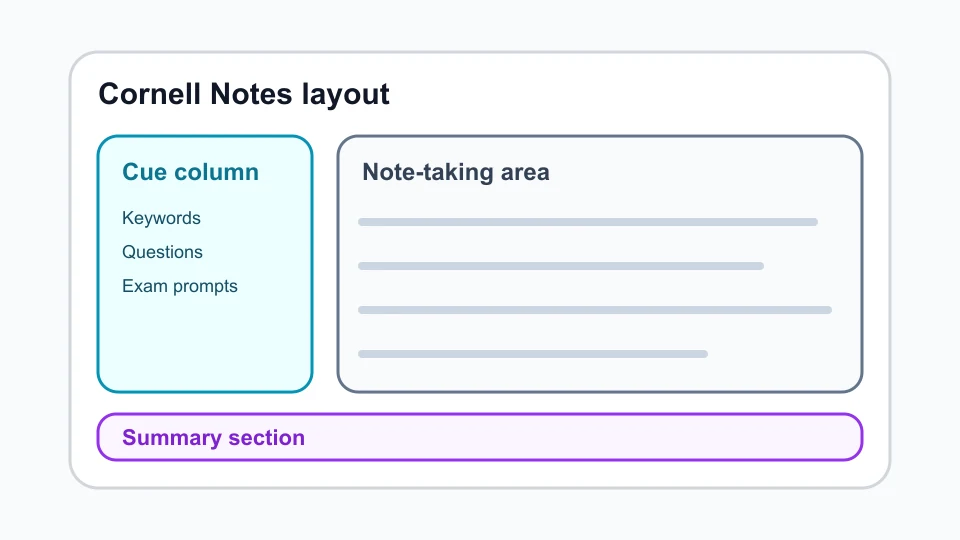
The Cornell Note-Taking Method is a structured approach created to improve learning and information retention. The traditional layout divides a page into three main areas: a cue section for keywords and questions, a larger notes section for detailed information, and a summary section for reviewing the main ideas. This organization encourages active participation instead of simply copying information without understanding it.
Using a Cornell Notes Word Template makes this method easier because the required sections are already prepared. Users can focus more on capturing important ideas rather than spending time designing a page layout. This approach supports better comprehension, improves review habits, and helps students or professionals transform complex information into organized and meaningful notes.
Benefits of Using a Cornell Notes Word Template
A Cornell Notes Word Template provides several benefits for people who need a reliable system for managing information. One major advantage is improved organization because every important detail has a specific place. Users can quickly find definitions, questions, explanations, and summaries without searching through unstructured pages of notes. This saves time and makes preparation for exams, presentations, and projects more efficient.
Another benefit is customization. Microsoft Word allows users to adjust fonts, headings, spacing, and layouts according to personal preferences. Students can create subject-specific templates, while professionals can design meeting note formats that match their workflow. The flexibility of a Cornell Notes Word Template makes it suitable for different learning environments and professional situations.
How to Use a Cornell Notes Word Template in Microsoft Word
Using a Cornell Notes Word Template in Microsoft Word is simple, even for users with basic computer skills. After downloading or creating a template, users can open the file and begin adding information to the designated sections. The notes area is used for detailed explanations, while the cue column helps identify important topics and questions for future review.
After completing notes, users can improve organization by adding headings, highlighting important concepts, and reviewing summaries regularly. Microsoft Word also allows documents to be saved in different formats, including DOCX and PDF. This makes it easy to store digital notes, print physical copies, or share documents with classmates, teachers, colleagues, or team members.
Creating a Custom Cornell Notes Template in Microsoft Word
Creating a personalized Cornell Notes Word Template allows users to design a format that matches their specific needs. Microsoft Word provides tools such as tables, borders, text boxes, and page settings that can be used to create the traditional Cornell layout. Users can adjust the size of each section depending on whether they need more space for detailed notes or summaries.
A customized template can improve consistency because every note page follows the same structure. Students who take notes for multiple subjects can create separate templates for science, history, business, or technical topics. Professionals can also adapt the layout for meetings, interviews, research notes, and project planning, making the template a valuable productivity tool.
Free Cornell Notes Templates and Digital Alternatives
Many websites provide free Cornell Notes Word Templates that users can download and edit. These templates are available in different styles, including simple classroom formats, professional layouts, and printable versions. Some users prefer Microsoft Word because it provides strong editing features, while others choose alternatives such as Google Docs, OneNote, or PDF templates for different workflows.
Digital alternatives offer additional benefits such as cloud storage, collaboration, and access from multiple devices. However, the core Cornell structure remains the same across platforms. Whether using Word, Google Docs, or another application, maintaining a consistent note-taking system is more important than the specific software. A well-organized template helps users create better notes regardless of the platform they choose.
Tips for Getting Better Results With Cornell Notes
Using a Cornell Notes Word Template effectively requires more than simply writing information in the provided sections. Users should focus on recording important ideas rather than copying every word from a lecture or discussion. Writing short phrases, adding keywords, and creating summaries after completing notes can improve understanding and make future reviews much easier.
Regular review is another important part of the Cornell system. Revisiting notes shortly after a lesson or meeting helps strengthen memory and identify areas that require additional attention. Combining the template with active study techniques, such as self-questioning and summarizing, can turn ordinary notes into powerful learning resources that support long-term knowledge retention.
Conclusion
A Cornell Notes Word Template is an effective tool for anyone who wants a more organized and productive way to record information. Its structured design helps users separate key ideas, supporting details, and summaries, making notes easier to understand and review. From classrooms to professional workplaces, this method provides a simple yet powerful approach to managing information.
With Microsoft Word customization options, users can create templates that fit their personal learning style and professional requirements. By combining a reliable template with consistent review habits, the Cornell note-taking method can improve organization, productivity, and overall learning success.
FAQs
What is a Cornell Notes Word Template?
A Cornell Notes Word Template is an editable Microsoft Word document based on the Cornell note-taking system, designed to organize notes into sections for keywords, details, and summaries.
Can I download a free Cornell Notes Word Template?
Yes, many websites offer free editable Cornell Notes Word Templates that can be customized and used for study or professional purposes.
Is the Cornell Notes template available in Microsoft Word?
Yes, many Cornell Notes templates are available in DOCX format and can be edited directly in Microsoft Word.
Can I convert a Cornell Notes Word Template into PDF?
Yes, Microsoft Word allows users to save or export templates as PDF files for printing or sharing.
Who can benefit from using Cornell Notes?
Students, teachers, researchers, and professionals can use Cornell Notes to organize information and improve learning efficiency.
You May Also Read: Quordle Hint